🔖 Online Photo Resizer

Government Exam Photo Resizer

Government Exam Photo Resizer

Resize, crop, and optimize your photo for various government exams with precise specifications

Upload Photo

Drag & Drop your photo here

or click to browse files

Supported formats: JPG, PNG, GIF, BMP, WebP

Image to crop
-180° 180°
Dimensions & Settings
Dimensions (Pixels)
px
px
Dimensions (Centimeters)
cm
cm
72 DPI (Screen) 300 DPI (Print) 600 DPI (High Quality)
Output Settings
PDF will be generated with the image embedded
Low 90% High
(Higher quality = larger file size)
10 KB 100 KB 500 KB
Target: 100 KB | Current: -- KB
Exam Presets

Select an exam to auto-fill the required photo specifications

UPSC
3.5x4.5 cm
SSC
200x250 px
Bank PO
4.5x3.5 cm
Railway
3x4 cm
Defense
3.5x4.5 cm
Custom
Set your own
Real-time Preview

Upload an image to see preview

Updating...

Updating preview...

Preview
Dimensions: 300x300 px
File Size: ~45 KB
Format: JPG
Quality: 90%
Process and Download

Government Exam Photo Resizer Tool © 2023 | Designed for precise photo specifications

© 2024 Government Form Photo Tool | Mobile Optimized

Your photos are processed on your device • No uploads to server

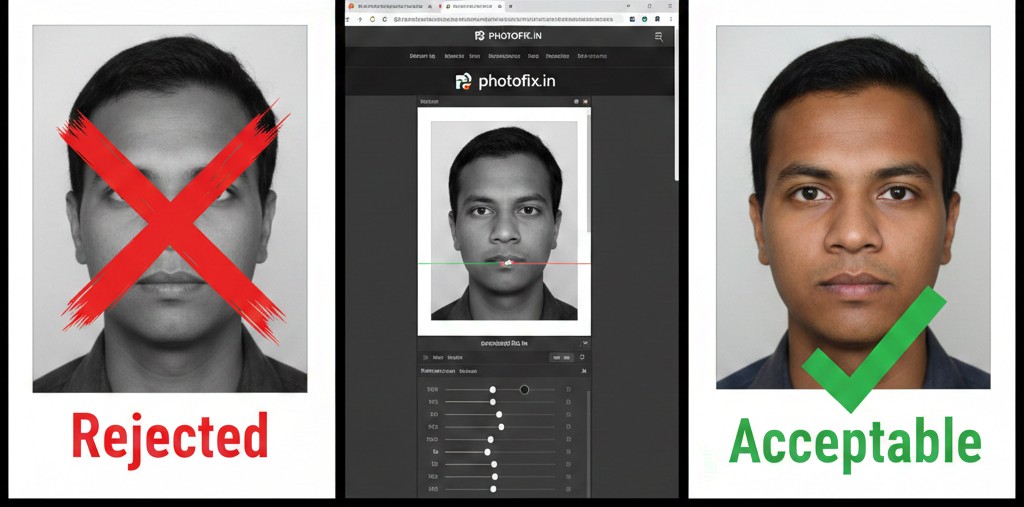
:Rejected to Acceptable ✅

1769588491061~2

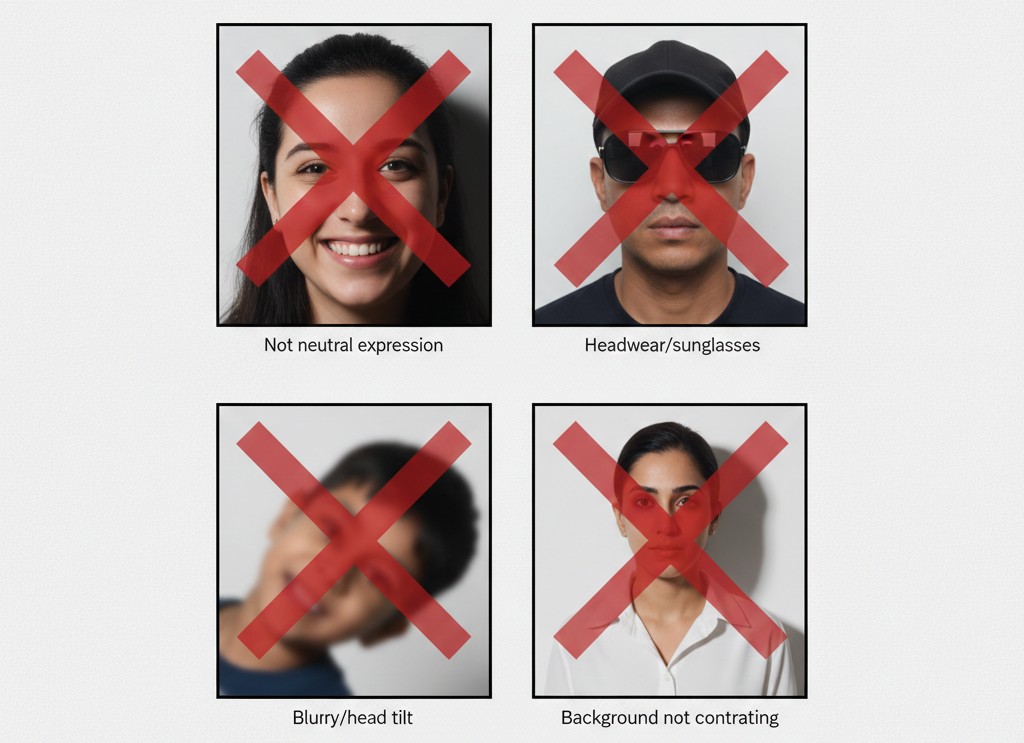
:Some common examples of rejected Photos by government Sites ❌

1769589145123~2

🧾🎗️

Table of Contents

This is the heading

This is the heading

This is the heading

This is the heading

This is the heading

This is the heading

This is the heading

This is the heading

Resize Photo and Signature Online for Government Exams (Free & Instant)

Welcome to PhotoFix – a simple and fast online tool to resize photo and signature for government exams and other official uses. If your exam form requires a specific image size like 20KB, 50KB, or 100KB, you can easily adjust it here within seconds.

Many candidates face rejection because their uploaded photo or signature does not match the required file size or dimensions. Our tool helps you convert and resize images accurately without reducing clarity.

Why Use Our Photo Resize Tool?

✔ Resize photo to exact KB size
✔ Convert image to 20KB, 50KB, 100KB instantly
✔ Resize signature for online forms
✔ Maintain image quality
✔ No registration required
✔ Free and secure

Whether you are applying for exams conducted by
Staff Selection Commission,
Railway Recruitment Board,
Institute of Banking Personnel Selection, or other recruitment boards, correct image upload is mandatory.

Common Photo & Signature Requirements

Most government exams require:

Photograph
  • JPG/JPEG format
  • 20KB – 100KB file size
  • Clear front-facing image
  • White or light background

Signature
  • Black ink on white paper
  • JPG/JPEG format
  • 10KB – 50KB file size
  • Properly cropped
Always check your official notification before uploading.

How to Resize Your Image in 3 Simple Steps

  1. Upload your photo or signature
  2. Enter required file size or dimensions
  3. Click resize and download instantly
The process takes less than 30 seconds and works smoothly on both mobile and desktop.

Convert Image to 20KB, 50KB or 100KB Without Losing Quality

If your form shows error like “File size too large” or “Invalid image size”, simply upload your image here and reduce it to the required size. Our compression system keeps your image clear while reducing file size efficiently.

Who Can Use This Tool?

  • Government exam aspirants
  • Job applicants
  • Students filling admission forms
  • Anyone needing image resizing for official documents
PhotoFix is designed to make the application process easier and prevent unnecessary rejection due to image errors.

Start Resizing Now